Webinar Platforms for Virtual Learning Environments
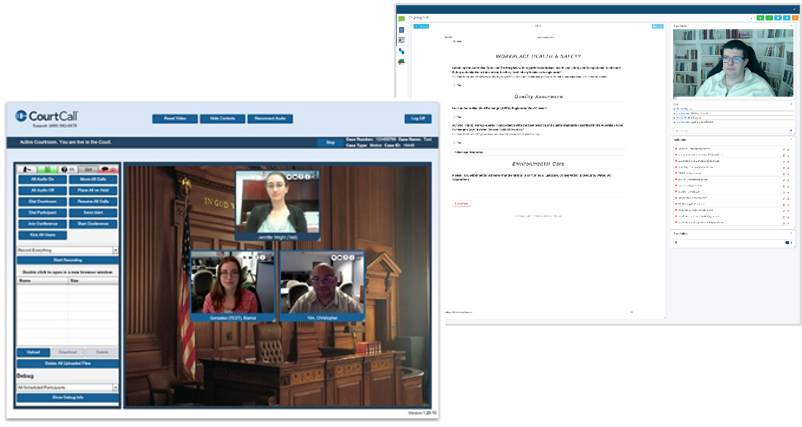
Webinar Platforms for Virtual Learning companies are digital tools that enable the delivery of live, instructor-led sessions to remote learners. These platforms are designed for hosting engaging, interactive, and scalable online events such as training sessions, workshops, onboarding programs, panel discussions, and product demos. They play a central role in the virtual learning ecosystem by combining content delivery, participant engagement, and real-time interaction.
Unlike standard video conferencing tools, webinar platforms are built specifically for teaching at scale, often supporting hundreds or thousands of attendees with features that facilitate structured instruction, learner interaction, and post-session analytics.

High-Capacity Hosting
Custom webinar platforms are built to handle large audiences—ranging from dozens to thousands of participants—without compromising on performance or stability.
Engagement Tools
Content Sharing & Media Support
To combat virtual fatigue and passive learning, webinar platforms offer built-in features that keep participants engaged and interacting with content.
Expanded Features:
Live polls, quizzes, and instant feedback collection
Real-time chat (public and private), emoji reactions, and hand raising
Gamification tools like leaderboards and digital badges
Interactive whiteboards, drawing tools, and annotation features
“Spotlight” mode to highlight learner contributions or questions
Why It Matters:
These features transform passive viewers into active participants, increasing retention, satisfaction, and overall learning effectiveness.
Custom platforms support dynamic content delivery through integrated media tools, enabling facilitators to share various types of instructional content.
Expanded Features:
Screen sharing, file uploads, and multimedia integration
Embedded video playback with pause and rewind options
Slide deck support with clickable elements (PowerPoint, PDFs)
Interactive learning apps embedded directly in the session
Real-time content switching without disrupting flow
Why It Matters:
Flexible content delivery allows facilitators to adapt sessions on the fly and cater to different learning styles—whether visual, auditory, or experiential.
Custom Branding & Layouts
Recording & Replay Options
Custom webinar platforms allow companies to maintain their brand identity across all virtual learning touchpoints.
Expanded Features:
Branded registration pages, confirmation emails, and reminders
Company logos, color schemes, and branded slide templates
- Custom features that are not included in standard platforms like CEU credit calculations, alerts that provide the participant in present and custom reporting
Branded virtual waiting rooms with music, timers, or preview slides
Customized interface layouts for both facilitators and learners
Presenter title cards, lower thirds, and virtual backgrounds
Why It Matters:
Brand consistency increases professionalism and trust. It also enhances the learner experience by giving a polished, cohesive feel to each training session.
Sessions can be recorded and repurposed for asynchronous learning, compliance tracking, or future reference.
Expanded Features:
Auto-recording with time-stamped interactions (polls, questions)
Cloud-based storage and easy sharing links
On-demand replay portals with progress tracking
Ability to edit recordings before publishing (trim, add captions or quizzes)
Integration with LMS for content reuse
Why It Matters:
Learners who miss live sessions can catch up, and organizations can build a library of reusable training content—great for onboarding and long-term development.
More about Brookwood
Expertise
Staffing
Staffing
Industries
Industries
About Us
About Us
Polling, Chat & Whiteboard
Brookwood’s custom webinar platforms include dynamic polling, interactive chat, and collaborative whiteboard features to boost engagement and real-time participation. Polling allows hosts to gather instant feedback, while chat fosters audience interaction and Q&A. The whiteboard tool enables presenters and participants to visually collaborate, brainstorm, and highlight key concepts throughout the session.
Audio and Video
Our custom webinar platforms support high-quality audio and video streaming for clear, reliable communication across any device. Hosts can share webcams, screen content, or pre-recorded media, while managing participant audio settings to maintain a professional experience. Advanced controls ensure smooth transitions between speakers and seamless multimedia integration.
Advanced Moderator Controls
Our custom webinar platforms include advanced moderator controls that empower hosts to manage the session with precision. Moderators can control participant access, manage breakout rooms, launch polls, and monitor engagement in real-time. These tools ensure a smooth, secure, and interactive experience for all attendees.
Docusign Integration
Brookwood offers custom DocuSign integration to streamline the collection of digital signatures directly within your webinar or training platform. Documents can be automatically pre-filled with participant data, signed in-session, and securely stored or routed based on your workflow. This seamless integration ensures compliance and accelerates the completion of agreements, waivers, or attendance confirmations.
File Transfer
Brookwood’s custom webinar platforms include secure file transfer capabilities, allowing presenters to share documents, slides, or resources directly with participants during a session. Files can be downloaded instantly or set to expire after a designated time, ensuring controlled access. This feature supports multiple file types and simplifies the distribution of materials in real time.
Record, Edit & Rebroadcast
Brookwood’s webinar platforms offer robust recording capabilities, capturing both audio and visual content in high quality. Recordings can be edited post-session to trim segments, add overlays, or remove sensitive content before being published. Rebroadcast features allow sessions to be scheduled and replayed with live chat support, enabling extended reach and ongoing engagement.
Attendance Verification
Brookwood’s webinar platforms include built-in attendance verification tools designed to support the issuance of CEU credits. Features such as timed check-ins, participation tracking, and random engagement prompts ensure learners remain active throughout the session. Detailed reports provide administrators with time-in/time-out data and interaction logs to verify eligibility for credit.
Advanced Reporting
Brookwood’s advanced reporting capabilities provide comprehensive insights into webinar and training performance. Administrators can access real-time dashboards and export detailed reports covering attendance, engagement metrics, poll responses, quiz results, and CEU eligibility. Custom filters and data visualizations help organizations make informed decisions and demonstrate learning impact.
Technical Support Pods
A custom Technical Support pod integrated into the Connect meeting room, allows the support team to assist learners in real-time without having the learner to leave their Connect session. Our solution integrates multiple tiers of support with routines for escalation, folds seamlessly into the application, and provides real time meeting support.